Tag: AI

What should the central AI CoE own?

Governing AI Agents in Practice — Article 02

When several teams start building AI agents, each team will face some of the same questions. What needs to be checked before release? When should security be involved? Where should ownership be recorded?

If every team works this out separately, the organisation can end up with different standards for similar risks. Asking a central team to approve every decision creates another problem: work queues up, even when teams could safely proceed themselves.

This is where I would give the central AI Centre of Excellence a clear remit: establish shared standards, help teams apply them and maintain oversight of how agents are being used.

Each business owner remains accountable for their agent’s purpose and outcomes. The CoE is accountable for making the shared governance arrangements clear, usable and subject to review.

Set a minimum that teams can use

I would start with a short set of requirements for agents entering business use. These should cover accepted ownership, a proportionate risk assessment and the evidence needed for release.

The assessment should consider the information an agent uses, the people affected and the actions it can take. Release requirements should include testing, support arrangements and a way to stop or recover the service.

The CoE should develop these requirements with the teams that already hold relevant authority. Security retains responsibility for security policy and security exceptions. IT retains its agreed platform administration and service management responsibilities. Risk and compliance teams retain their assessment and approval responsibilities.

The CoE brings those requirements into a usable process. Teams should know who sets each requirement, who checks it and who can authorise an exception.

They also need help meeting the standard. Reusable ownership records, assessment prompts, test examples and patterns for human review can save repeated work. Advice sessions can help resolve questions early. The CoE should maintain this guidance as teams learn what works.

Keep visibility and make specialist review clear

The CoE should maintain a shared view of agents in business use: their purpose, accountable owner, risk level, operational contact and review status.

Exceptions belong in that view, with a reason, an authorised decision-maker and an expiry or review date. Teams should update the record when ownership, scope or capabilities change. The CoE can then follow up on missing owners, overdue reviews and unresolved exceptions.

Specialist review needs clear triggers. New access to sensitive information should involve security and the relevant data owner, with privacy specialists where needed. Permission to change business records should involve IT and the process owner. Actions with significant financial, legal or personal consequences should involve the relevant risk or compliance specialist.

Complexity matters too. Several connected systems or a sequence of dependent actions can make an agent harder to test, support and recover. That may justify technical review. A simple agent can still carry significant risk: the assessment needs to consider both the likelihood of harm and its consequences.

These are review criteria I would agree locally with the specialists. Teams should identify review needs early and revisit them when the agent changes. The CoE should provide a clear contact when teams are unsure which requirements apply.

Think about:

Imagine a hypothetical purchasing agent that answers staff questions using approved guidance.

Procurement uses the CoE’s assessment and testing templates, accepts business ownership and validates the answers. IT and security apply the relevant controls. The agent is recorded and follows the agreed release route.

Later, the team proposes allowing it to create purchase orders.

That change triggers further review. Procurement defines spending authority and human approval requirements. Security reviews access. IT reviews the integration and recovery arrangements. Risk specialists become involved according to the agreed criteria.

The CoE helps coordinate the review and updates the shared record. Procurement remains accountable for the purchasing outcomes.

For teams using Copilot Studio, Microsoft documents how administrators can use Power Platform data policies to restrict connectors and publishing channels. My recommendation is to use those controls to support the agreed standards, alongside business checks and named decision-makers.

Keep central review proportionate

The trade-off is between oversight and the central team’s capacity. Requiring a CoE meeting for every routine release creates a queue.

I would let teams proceed within agreed limits when the required evidence is recorded, with periodic checks by the CoE. Higher-risk changes and exceptions would receive specialist attention before release. This depends on teams understanding the limits and keeping records current.

How central and business teams organise that work is the subject of the next article, including the hub-and-spoke model. First, they need agreement on what the CoE owns and which decisions remain elsewhere.

Further reading

Who owns an AI agent after it goes live?

Ownership, held in hand

Governing AI Agents in Practice — Article 01

An AI agent has gone live. People are using it, the project team has moved on, and someone reports that it has given the wrong advice.

Who picks that up?

The person who built it might investigate. IT might check whether the service is running. The business team might correct the answer. But who decides whether the agent should keep operating while the problem is understood?

That is the ownership question I would settle before launch.

Separate the responsibilities

My starting recommendation is to name a business or product owner who is answerable for the agent’s purpose, outcomes and results. That person should understand what useful performance looks like, prioritise improvements and secure funding for its continued operation.

A product owner taking this role needs the authority to make those business decisions. Recording a name is only useful if the person understands and accepts the accountability.

This does not mean asking that owner to troubleshoot integrations or approve security exceptions. Those responsibilities need their own owners and authority.

Technical maintenance covers the agent’s configuration, connections, testing and releases. It also requires a working relationship with whoever owns the information the agent uses. A technically healthy agent can still give an unsuitable answer when its source material is outdated or contradictory.

Operational support covers what happens when someone needs help: receiving reports, assessing impact, involving the right specialists and coordinating recovery.

Depending indefinitely on the original maker is fragile. People change teams, leave the organisation or take on other work. Support needs documented knowledge, appropriate access and someone who can take over.

In a smaller organisation, one person may cover several roles. The important thing is to make the responsibilities explicit and provide backup.

A hypothetical example: an expense-policy agent

Imagine a company introduces an agent in Microsoft Teams, built with Copilot Studio. Employees use it to ask about travel expenses and prepare reimbursement requests. Finance staff still approve payments.

A few weeks after launch, the company changes its hotel allowance. An employee reports that the agent is quoting the previous limit.

The service desk records the issue and routes it to the agreed support lead. Finance confirms the correct policy and assesses whether employees have relied on the wrong answer. The technical maintainer investigates whether the cause is an old document, conflicting sources or the agent’s handling of the question.

Under an agreed incident procedure, support can suspend the affected function and direct employees to Finance. The business owner coordinates the response to affected users. Finance validates corrected answers, and the technical team completes the required checks before the function returns.

Nobody needs to own every part of that response. They do need to know who makes each decision.

Now imagine the agent also approves reimbursements. Who sets approval limits, reviews disputed decisions and authorises recovery when an incorrect payment occurs? The support arrangement should reflect those consequences.

Where the CoE fits

The Centre of Excellence can establish shared policies and guide teams on ownership, testing, monitoring and escalation, working with security, risk and service management.

It can also make ownership visible through a documented record: who is accountable, who maintains the agent and where support requests should go.

The CoE needs a defined remit and enough capacity to carry it out. Making it responsible for every agent’s answers, maintenance and incidents would quickly stretch that remit beyond what it can reasonably manage.

Some organisations may initially need a central team to maintain agents because specialist skills are scarce. Even then, each agent still needs someone accountable for its business outcomes.

Make ownership usable

Before launch, I would ask the people involved to complete a short ownership record covering:

  • The accountable business or product owner, technical contact, support lead and their backups.
  • Who maintains the source knowledge and validates business correctness.
  • Who can suspend the agent, and who approves its return.
  • Support hours, escalation routes and a fallback process.
  • The review date, running-cost budget and person authorised to retire it.

Then walk through one realistic incident together. A missing decision becomes easier to spot when people explain what they would actually do.

Review that record when people leave, the agent gains new capabilities or its business purpose changes. Ownership has to remain usable after the launch meeting.

A practical test is simple: if the agent gives a harmful answer tomorrow, can the people responsible explain who will respond, who will decide and how users will keep working?


Further reading

Call AI Models Using Power FX

Power Fx is the general-purpose, strong-typed, declarative, and functional programming language used across the Microsoft Power Platform. This excel-like formula language helps app makers to create apps using low code, read more about Power FX here.

With the latest announcement, Microsoft is giving another level of possibilities with Power FX. Now, you can bind the AI model to any control using Power FX. You heard it right! any control. Earlier it was possible to use AI with the AI builder controls only. Now, Microsoft has made it easier than ever to add intelligence to your Power Apps directly through Power FX. Let’s see how to use this feature for a text control to detect the language entered.

Turn on the AI models as data sources option

Got App setting and turn on AI model as date source

Figure1: Turn on Ai model as data source

In your power app, under the app settings go to Upcoming features > Preview, and turn on the AI model as data sources.

Add your AI model as Data Source

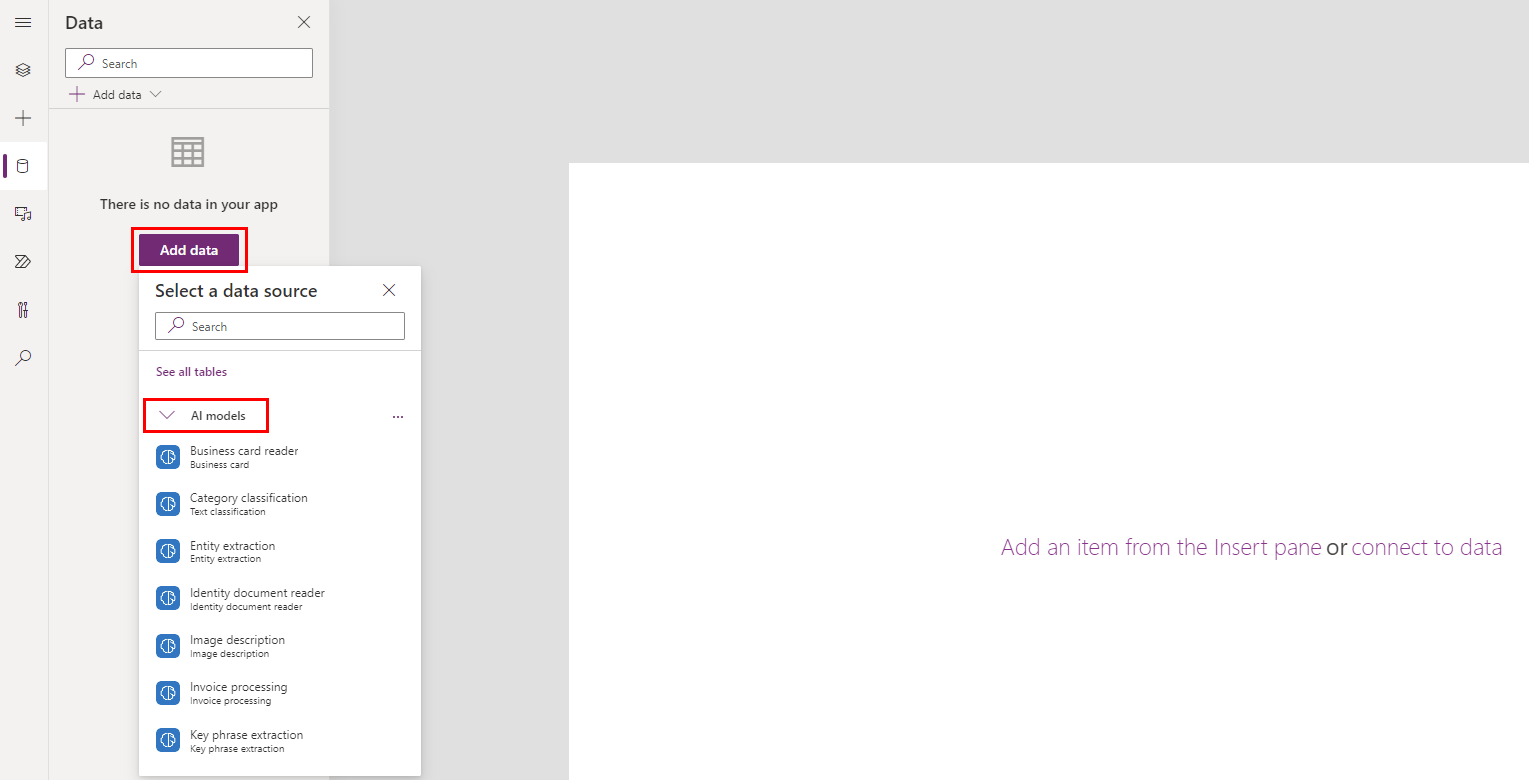
Under the Data tab, go to Add data and In the AI models list, select a language detection model. To know more about AI models please check the official Microsoft docs here.

Screenshot of how to select your model.

Fig 2: Add your AI model to the APP

Add your Controls

Place a text input and two text labels on the canvas as explained below

  1. Rename the text input to TextInput1.
  2. Select Text label and place it on the canvas.
  3. Rename the text label to Language.
  4. Add another text label by selecting Text label and place it to the right of the Language text label.

Call the AI model using Power FX

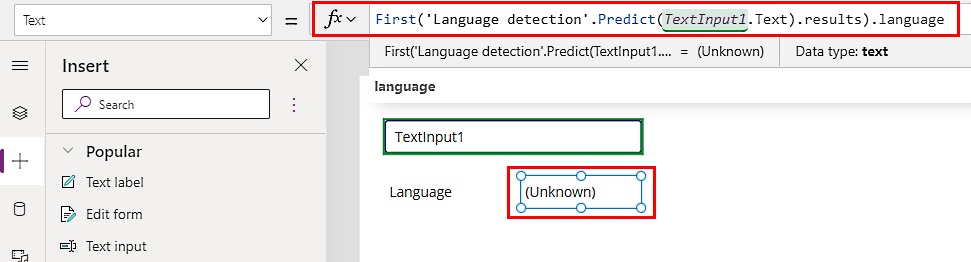
Now we can use the power FX formula to call the AI model method. Select the text label you added in step 2 and enter the following Power Fx formula.

First('Language detection'.Predict(TextInput1.Text).results).language
Screenshot of the Power Fx formula.
Fig 3 : Power FX formaula

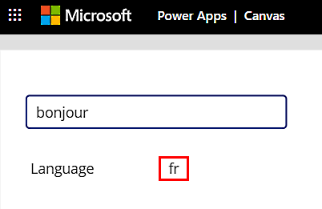
Now, save and run the app. You can type in random languages in the text box to see the AI model in action.

Screenshot of how to try out the app you created.
Fig 4: language prediction.

Now you have bound the AI model to a normal label control using Power FX.

Formula explained

‘Language detection’.Predict(TextInput1.Text).results returns a table of possible languages detected with the score. The language with the highest score (highest possible match) will be the first item in the table. So, using the function ‘First‘ the most matching language code is set to the label.

Another example of a prediction model can be found here.

Source: https://docs.microsoft.com/en-us/ai-builder/powerfx-in-powerapps

Hope this helps.